Views: 0 Author: Site Editor Publish Time: 2026-05-11 Origin: Site
Let's be real for a second. You've spent millions on servers, switches, and storage, but your data center still sounds like a jet engine, and your equipment is overheating. What's the problem? It's often right under your feet—your raised floor tiles. Specifically, the perforated ones. If you don't get these tiles right, your cooling bills will go through the roof, and your IT gear will slow down. In this guide, I'll show you everything you need to know about perforated raised floor tiles to fix your airflow. Let's get started.
Why Your Data Center Feels Like a Sauna
Have you ever walked into a server room and felt a blast of hot air? It's not fun. Most managers think turning up the AC is the solution. But that's like trying to cool your house by leaving the front door open—you're just wasting energy. Perforated raised floor tiles are the gatekeepers of cold air. They take cold air from under the floor and direct it up into the cold aisles. If those tiles are chosen or placed poorly, the air escapes through cable holes, leaks around unsealed joints, or comes out with so little pressure that it barely reaches your servers. We need to fix that. Today, we'll make you an airflow expert.
What Are Perforated Raised Floor Tiles?
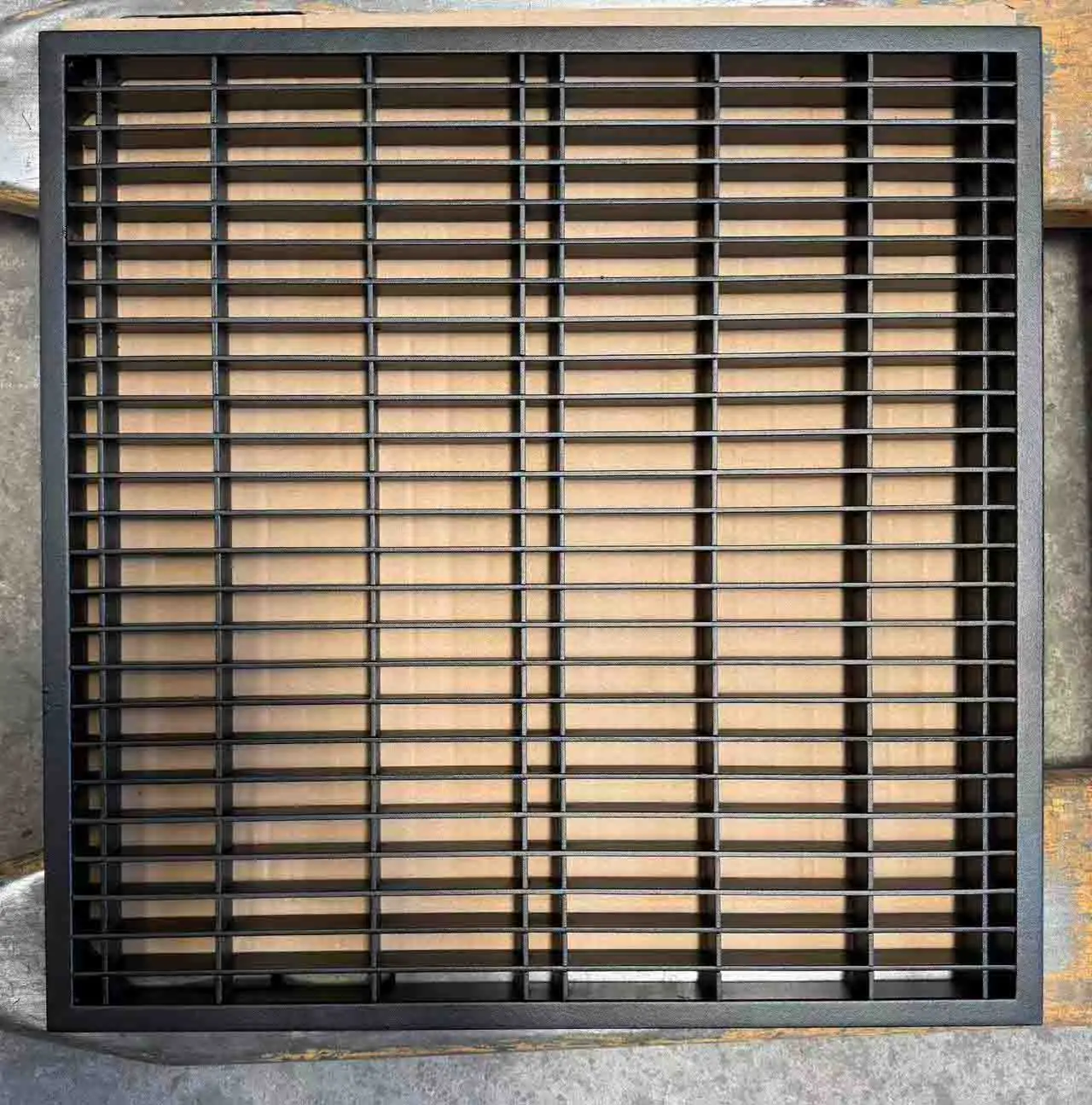
Simply put, these are floor panels with holes in them. They replace solid panels in certain spots of a raised floor data center. While solid panels keep cold air down, these let cold air flow up to your servers. They come in steel, aluminum, or composite materials. The key isn't just the holes—it's the hole pattern. Some have round holes; some have angled vents that direct airflow. But for most data centers, the standard round-hole tile works just fine. Without these tiles, your server fans would struggle to get enough air.
How the Holes Work: Perforation Ratios Explained
Let's get a little technical for a minute. You'll hear the term "Open Area Percentage" — that's just the total hole area divided by the total tile area. For example, a tile with 25% open area means 75% of it is still solid. This number affects air pressure and flow. Here's the challenge: too many holes with low pressure = air comes out too slowly. Too few holes with high pressure = air shoots out like a firehose but doesn't cover enough space. It's all about balance. You need enough resistance to spread air evenly to all tiles, but not so much that your cooling units struggle against it.
Solid vs. Perforated Tiles: Which One Wins?
Solid tiles are the boring, reliable ones. They seal the floor. You walk on them, you put racks on them. Their job is to keep cold air down. Perforated tiles are different—their job is to bring cold air up. The biggest mistake? Using perforated tiles where there's no equipment. If you put a vented tile in a hot aisle, hot air from the servers will go right back down through that hole and mix with the cold air below. That's bad.
Simple rule: Use solid tiles everywhere, except in the cold aisle right in front of your server intake fans.
Why Fixing Airflow Matters
Ignoring airflow is expensive. It's not just about higher electric bills—it's about your servers' lifespan. Every 10°C (18°F) temperature increase can cut hardware life in half. Perforated tiles are the cheapest insurance you can buy. When you place and choose them correctly, you can actually raise your thermostat. Yes, you read that right. ASHRAE (the cooling standards group) now recommends higher temperatures—often 75-80°F—if airflow is managed well. That saves a lot of money on cooling. So fixing your tiles doesn't just cool your equipment; it saves you cash.
Common Mistakes That Block Airflow (And Kill Hardware)
I've seen some bad setups. Data centers where every single tile has holes—the floor looks like Swiss cheese, and there's no air pressure underneath. The air just sits there. Even worse, I see big bundles of cables running through unsealed holes in the floor, letting all the cold air escape before it reaches the far end of the row. You wouldn't leave a window open in winter, so why leave holes under your racks? Avoid these traps.
Mistake #1: Using the Wrong Hole Amount
Running low-density storage but using 56% open tiles? You're flooding the area with cold air that just spills out and does nothing. On the other hand, running AI training clusters with high heat but using cheap 12% open tiles? Your equipment is starving for air. Match the tile to the heat. High heat = more holes. Low heat = fewer holes or solid tiles.
Mistake #2: Ignoring the Air Pressure Under the Floor
The space under the floor is your air reservoir. If you create too many openings (holey tiles + cable holes + leaks), the pressure drops. When pressure drops, air slows down. Slow air heats up before it even reaches your servers. You need positive pressure. A simple test: take a tissue. Put it over a holey tile. Does it get sucked down? That's bad (negative pressure). Does it blow up and float? That's good. Does it do nothing? That's a dead zone.
How to Pick the Right Perforated Tile for Your Rack
Don't worry—you don't need to be an engineer. Just use this simple formula: Total air needed by the rack ÷ Number of tiles in front of the rack = Air needed per tile. Most server makers list the required airflow on their spec sheet. Add those numbers up. Then check your tile maker's data sheet. A standard tile with 25% holes usually delivers 400-600 CFM at normal pressure. If your rack needs 1000 CFM, you need two of those tiles or one tile with 56% holes. Simple math saves your equipment.
Step 1: Measure Your Cooling Unit's Air Output
Before buying any tile, know what you're working with. Your CRAC unit pushes a specific amount of air. If it only puts out 10,000 CFM total, you can't install 20 tiles that each need 1,000 CFM—they'll be starved of air. Use a thermal camera or an anemometer (a wind-speed meter) to check the airflow at floor level. If the air coming out of your current tiles is below 300 feet per minute (FPM), your pressure is too low. You need to seal leaks or add more cooling units before changing tiles.
Step 2: Match Hole Amount to Heat Level
Here's my cheat sheet:
Low heat (under 2kW per rack): 15-20% holey tiles
Medium heat (2-5kW per rack): 25-35% holey tiles
High heat (5-10kW per rack): 40-56% holey tiles
Extreme heat (10kW+): Need active floor grilles or ducts. Don't try to cool 15kW with basic holes—it's like using a garden hose to fill a swimming pool.
25%, 35%, or 56% Holes? Which One to Buy?
Let's go through the options. Most older data centers do just fine with 25% holes. It provides good resistance, which means even pressure across the floor. 35% holes are the sweet spot for modern blade servers—they let more air through without losing speed. 56% holes (called "high flow") are almost like grates—you can see right through them. Only use these for "hot spots" like high-density computing rows. Use them sparingly, or they'll steal all the air from nearby tiles.
The 25% Rule: Low-Density Server Rows
I call this the "just right" tile. Not too many holes, not too few. If you have network switches, storage shelves, or older servers using around 300W each, 25% is perfect. It creates backpressure, which pushes air evenly across all tiles in your cold aisle. You won't get strong blasts—you'll get a smooth, steady flow. That's exactly what server fans want: a consistent, quiet stream of cool air, not a hurricane.
The 56% Beast: High-Performance Computing
Now for the heavy-duty stuff. If you have GPU clusters, AI accelerators, or dense computing nodes, 25% will choke them. You need 56% holey tiles. But warning: these tiles drastically reduce underfloor pressure. You may need to seal the rest of the floor with good grommets and brush strips. Also, don't put a 56% tile right next to a 25% tile. The air will rush through the 56% hole and leave the 25% tile completely dead. Group your high-heat racks together and give them their own "high-flow zone."
Where to Put Those Holey Tiles
It's like the game "Operation" — but with air. Only put holey tiles directly in front of where servers pull in air. That's the cold aisle. Place them so they cover the front of the rack. Don't put them under the back of the rack (the hot aisle). Don't put them under empty space. And please, don't put them under a large UPS unit that doesn't have fans — you're just wasting cold air on a panel. Use a grid pattern. If you have a row of 10 racks, put 2 holey tiles per rack, slightly staggered if the rack has a central power strip.
Hot Aisle/Cold Aisle Containment & Holey Tiles
If you've added barriers to separate hot and cold air, the rules change a bit. In a fully enclosed cold aisle, the pressure inside is trapped. This means you can usually use tiles with fewer holes because the air has nowhere to go except through the servers. You might drop from 35% holes down to 25%. But containment makes leaks worse. A single missing tile in an enclosed cold aisle is like a popped balloon — all your pressure disappears instantly. Keep it tightly sealed.
Preparing for Future GPUs
Let's look ahead. Next-gen chips are getting hotter, not cooler. And they're getting packed tighter. Rack power is expected to hit 30kW-50kW per rack in the next 3-5 years. Basic holey tiles won't be enough. You'll probably need to move away from raised floors entirely toward liquid cooling. But if you're sticking with raised floors for the next two years, buy adjustable holey tiles. These have a sliding vent. You can change the open area from 0% to 60% by hand. So when you add that new GPU server next month, you just walk over, turn a dial, and get more airflow. No need to buy new panels.
Think of Your Floor as a Showerhead
Raise your hand if you've used a cheap showerhead. You turn it on, and water drips out of every hole, but there's no pressure. You can't rinse your hair. That's a floor with too many holey tiles. Now imagine a good showerhead with well-sized holes that creates a strong spray. That's a floor with the right mix of solid and holey tiles. The space under the floor is your water pipe. The tiles are the nozzle. You want a strong, powerful spray (high speed) to reach the top of the rack, not a weak drizzle. When you optimize your tiles, you turn your data center from a sad sprinkler into a power washer for your servers.
Conclusion: Breathe Easy, Compute Harder
We made it. You're no longer a beginner with airflow. You now know that perforated raised floor tiles aren't just "floors with holes"—they're precision tools. By matching the hole amount (25%, 35%, or 56%) to your rack's heat level, sealing leaks under the floor, and placing those tiles only in the cold aisle, you can lower your PUE (Power Usage Effectiveness) by 15% or more.
Go check your data center right now. Do you see a holey tile in a hot aisle? Move it. Is there a solid tile starving a GPU? Swap it.
Your servers will run quieter. Your AC will run less often. And your boss will love the lower electric bill.
This website uses cookies and similar technologies (“cookies”). Subject to your consent, we will use analytical cookies to track which content interests you, and marketing cookies to display interest-based advertising. We use third-party providers for these measures, who may also use the data for their own purposes.
You give your consent by clicking "Accept all" or by applying your individual settings. Your data may then also be processed in third countries outside the EU, such as the US, which do not have a corresponding level of data protection and where, in particular, access by local authorities may not be effectively prevented. You can revoke your consent with immediate effect at any time. If you click on "Reject all", only strictly necessary cookies will be used.